 |
Juganu LMS API
V 3.0.0.5
Juganu Lighting Control API
|
|
Juganu LMS API
V 3.0.0.5
Juganu Lighting Control API
|
The purpose of this document is to provide a compressive programming guide to Juganu's 3rd party partners and
customers who would
like to integrate Juganu Lighting Solution within their existing system.
The Juganu LMS API (V 3.0.0.5), enables a rapid and smooth integration to own system.
Once integrated, Customer application be able to use the JAPI set of API to get control on
the Lighting system by means of turning Lamps ON/OFF, control their dimming, get useful statistic and
diagnostics, operate group of lamps
as subject to different operations, and more.
The next two sections introduce to the reader the Juganu Lighting system and highlight the role of the JAPI
within this view.
The rest of this document is targeted mainly to programmers and architects, and leads the reader into a
successful
utilization of the JAPI.
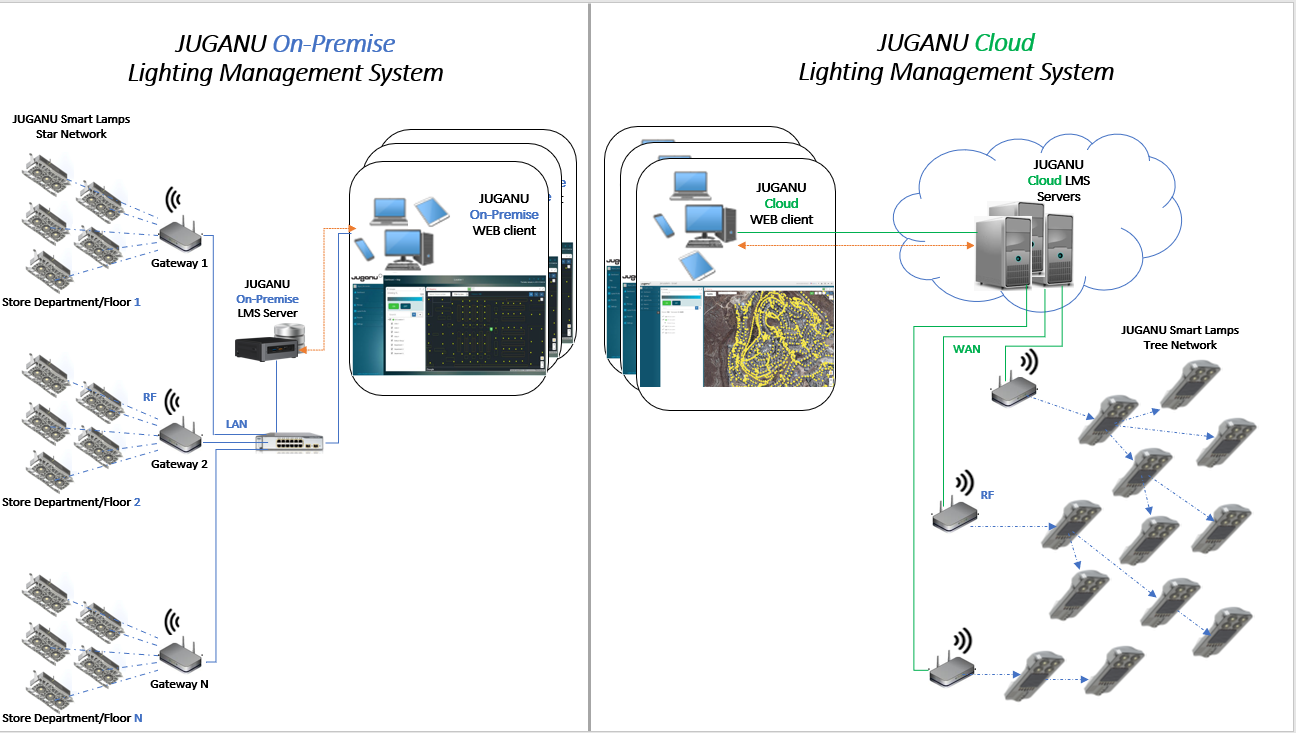
This subsection refers to lighting solution as provided by Juganu (aka, "off-the-shelf"). Juganu Lighting System supports two fundamental configurations:
Following picture describes Juganu On Premise and Cloud solutions:
This subsection refers to lighting solution as can be customized by Juganu's partners/Customer writing their
own interface to Juganu Lighting System.
JLedAPI WebClient
Enables the 3rd party Application to communicate with either the Cloud or the On premise solution.
Web Requests are targeted to either the cloud or the On premise Local server pre-defined IP:Port.
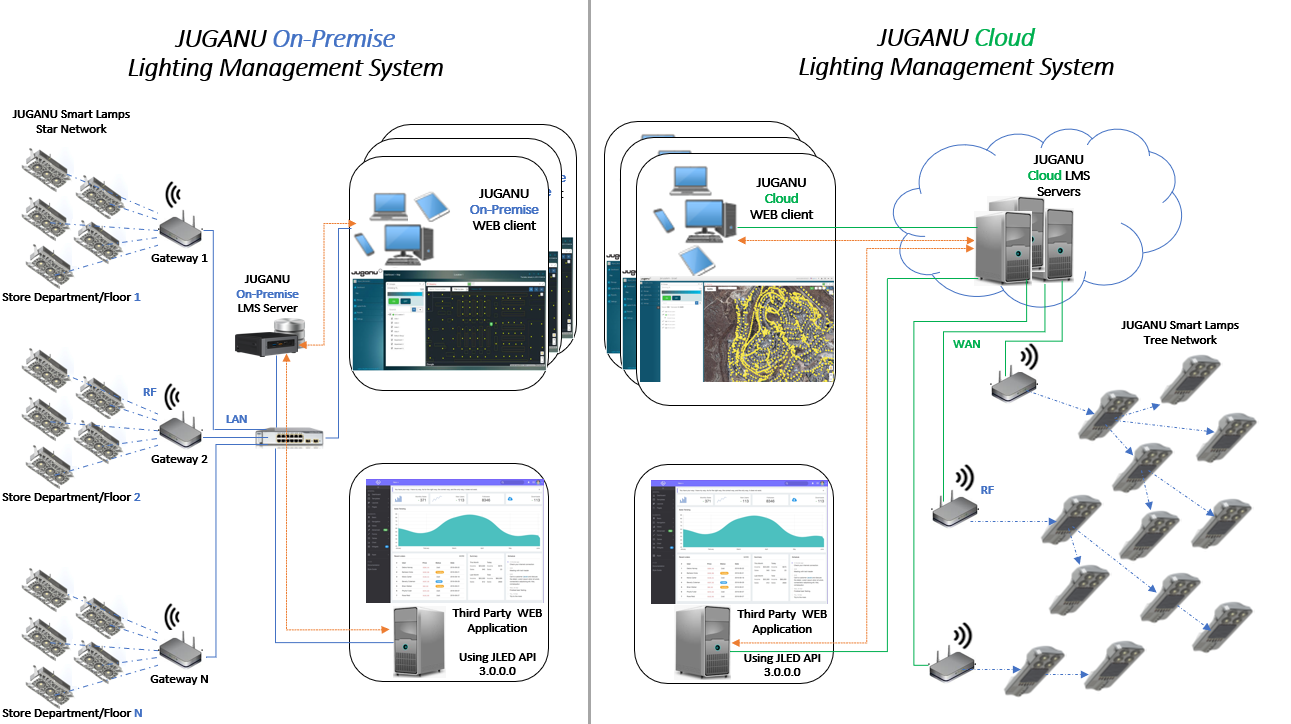
Following picture describes Juganu Lighting System building blocks when 3rd party Customer application
is in use.
Interfacing with the Lighting system requires the 3rd Party application to integrate with the Juganu Lighting Control API, and to leverage the provided.
Note that the picture left side refers to the On Premise where the right
side refers to the Cloud solution:
| Definition/Term | Description | |
|---|---|---|
| Login & Credentials | When approaching to the Web cloud, the Client Application needs to authenticate itself using
the method providing its credentials i.e., Username, Password To acquire your own credentials please issue a request to Juganu IT Team. Once successfully Authenticated, User is exposed to one or more Sites. The accessible site names list is outcome from the privileges associated with the user Credentials |
Site Company Gateway |
Site or Company stands (typically) for a location that covers, sometimes an entire city; Typical field implementation is where multiple Gateways are used to cover a site |
| Lamp | On pole fixture; The Lamp compartment (box) contains (typically) Power supply ('Driver'), Dimmer to control the LED Power, and Wireless capability to communicate messages between 'Lamps'. Progressing between the street light Lamps, The message reaches Eventually to the governing Gateway. The Gateway acts as a data aggregation point for its all subordinate Lamps(nodes), bridging the communication data to the LAN or WAN wired infrastructure towards the Control center. Software wise, the class JLamp is used to issue all transactions. i.e., Request/Response, to and from the physical Lamp's Dimmer. |
|
| Unicast | Communication method where the transmitted message is targeted to a specific Fixture(Lamp); each lamp is programmed in the Factory with a unique Serial Number, (3 bytes) The 'Serial Number' is part of the Request message frame being sent to the network/Lamp. |
|
| Broadcast | Communication method where the transmitted message is targeted to a specified network Group ID;
where Group is defined as ALL Fixtures(Lamps) residing under a selected Gateway. Note that the same Group ID must be programmed to the Gateway and its subordinate Lamps. Broadcast or Public(multicast) Request, e.g., Turn all Lamp ON/OFF, does not get any Response from the targeted Lamps. Broadcast address has a special unique value '0xFFFFFF' (3 bytes) |
|
| Public Address | Communication method where the transmitted message is targeted to a pre-defined group of Lamps. To add a Lamp to a 'Public Address Group', a prior configuration Request Unicast is sent to the lamp to program its Dimmer with the unique Public Address (3 bytes). Each Lamp/Dimmer may be configured up to four(4) Public addresses. A message transmitted to a 'Public Address' is accepted (filtered-in) just by those Lamps that were prior programmed to this address. |
|
| Lamp Autonomous Light Scheduling |
Juganu Lamp is occupied with a mechanism that enables the Lamp to control its LED's
dimming per a pre-define plan; Supported plan/profile types are:
|
|
The tools for the implementation of Juganu LMS API v 3.0.0.5 Postman and Swagger is recommended.
Swagger
With swagger with the code in openapi 3.0.0 yaml, you can copy the code and load it in Swagger where you can see the data types of each endpoint, types of arguments examples etc.
Link to Swagger
Postman
with Postman you will have at hand how to directly test the different endpoints.
Link to Import Collection
URL-BASE
This is the URL, to use for your site, it will go to the first part of all your endpoints.
{{URL-Base}} = https://api.juganudigital.com
 3.0.0.5